
Short answer: There are four broad methods for extracting data from documents: fixed templates, rules and patterns on top of OCR, trained machine learning models, and large language models (LLMs). Templates and rules are cheap and predictable on documents that never change layout. Trained models handle variation within a known document type. LLMs handle the widest variety, including long contracts and reports, but they need citations back to the source and human review, because they can produce confident answers that are not in the document. Most production systems combine several methods.
This guide sits next to our intelligent document processing guide, which explains the full pipeline. Here we focus on one question: which extraction method fits which documents.
First: what kind of document is it?
The right method depends less on the tool and more on the documents.
- Structured: the same layout every time. A standard form, a fixed export from your own system.
- Semi-structured: the same type of information in different layouts. Invoices from many suppliers, bank statements from different banks, purchase orders.
- Unstructured: free text where the data can be anywhere. Contracts, letters, reports, emails, meeting notes, information memoranda.
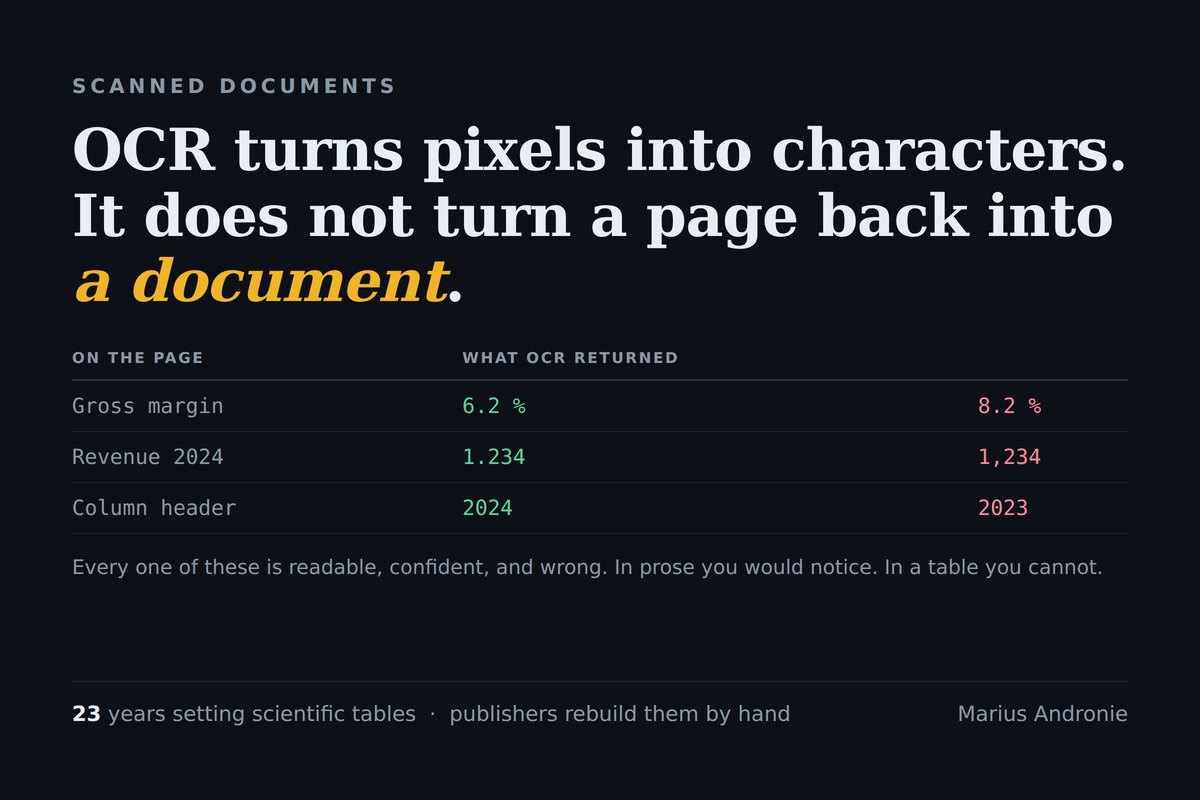
And separately: is it a born-digital PDF with a text layer, or a scan or photo that needs OCR first? Scans add a layer of risk that we describe in why a scan is not a document and sideways pages and readable garbage.
The four methods compared
| Method | How it works | Best for | Weak spot | Effort to set up |
|---|---|---|---|---|
| Templates (zonal extraction) | Read the value at fixed positions on the page | Structured forms with one layout | Breaks when the layout changes | Low per layout, grows with each new layout |
| Rules and patterns | Regular expressions, keywords and anchors ("Total:" followed by a number) on OCR text | Semi-structured documents with predictable labels | Brittle on wording changes and unusual layouts | Medium, ongoing maintenance |
| Trained ML models | A model learns fields from labelled examples of one document type | High volumes of one semi-structured type, such as invoices | Needs labelled data; weaker on rare layouts | Medium to high |
| LLMs | A language model reads the text (or image) and answers questions or fills a schema | Unstructured and varied documents, long contracts, mixed bundles | Can state things not in the document; cost per page; needs verification | Low to start, high to make reliable |
None of these is "the best". A template is perfect for your own export file and useless for a supplier's new invoice. An LLM can read a 60-page contract and find the change-of-control clause, but it is the wrong tool for a million identical forms.
Method 1: templates
Templates define boxes on a page: "the invoice number is always here". They are fast and fully predictable. Use them when you control the layout, for example forms your own customers fill in. Their weakness is that each new layout needs a new template, and a small change, like a supplier moving their logo, can quietly shift every box.
Method 2: rules and patterns on OCR text
Rules look for labels and patterns instead of positions: find "Invoice No", take the next value; find a date in a known format; find an IBAN by its pattern. This works across many layouts as long as the labels are predictable. The cost is maintenance. Each exception becomes another rule, and after a while nobody remembers why a rule exists.
Method 3: trained machine learning models
A trained model learns where fields are from labelled examples. It copes with layout variation better than templates or rules, and many commercial document AI services offer pre-trained models for common types such as invoices, receipts and identity documents. If your volume is high and your document types are common, this is often the most efficient choice. If your documents are rare or specialised, you need your own labelled examples, which takes time.
Method 4: large language models
LLMs changed what is possible with unstructured content. You can ask a model to read a lease and return the term, the rent review clause and the break options, or to read an information memorandum and list every claim about customers. That flexibility is real. So are the risks:
- They can produce values that are not in the document, especially when the relevant page is missing or unreadable. We tested this in AI models invent totals when a page is missing.
- They need the text to be right first. An LLM reading bad OCR produces confident answers from garbled input.
- They cost more per page than templates or rules, which matters at high volume.
The fix is design, not hope: require the model to cite the page and passage for every value, check that the cited passage actually contains the value, and send anything without support to a person. We explain the principle in cite the source or cut the claim, and the retrieval side in retrieval confidence scores and RAG hallucinations.
How organisations manage unstructured content
Extraction is one part of a wider job: keeping unstructured content findable, controlled and useful. The practical building blocks are:
- One place to store it. A document management system or shared drive with clear folders and owners, rather than files scattered across inboxes.
- Metadata at intake. Document type, date, counterparty, owner. Even a few fields make search and retention far easier.
- Text for every file. OCR scans at intake so the text is searchable, and keep the original image.
- Extraction for the fields that matter. Pull the specific data you use (dates, amounts, parties, renewal terms) into a system where it can be queried.
- Retention rules. Decide how long each type is kept and delete on schedule. For personal data, the GDPR principle of storage limitation applies (Article 5).
- Access control. Who can see which documents, and a log of access for sensitive ones.
For contracts specifically, a contract repository should at least store the signed version, track key dates (renewal, notice, expiry), record parties and obligations, control who can see each contract, and send reminders before deadlines.
Choosing for a small business
AI document processing can help small businesses most where documents arrive in varied formats and someone currently retypes data from them: supplier invoices, delivery notes, contracts, application forms. A sensible approach:
- Start with one document type that causes the most retyping.
- Collect 20 to 50 real examples, including the messy ones, before choosing a tool.
- Test candidates on your own examples, not on the vendor's demo files.
- Measure field by field. "It works" is not a result. Check each field against what a person would have entered.
- Keep a review step for anything that drives a payment, a legal deadline or a decision.
Our what to automate first with AI article gives a scoring method for choosing that first document type.
Where Deal OS fits
Due diligence is an extreme case of unstructured content: hundreds of documents, many scanned, mixed languages, and findings that must be defensible. Deal OS, our tool for AI-assisted due diligence, combines OCR with LLM reading, and every finding carries a citation to the source page so a person can check it. It is built for deal documents, not as a general extraction platform, and it supports the reviewer rather than replacing them.
Frequently asked questions
What are the main document data extraction methods? Fixed templates, rules and patterns on OCR text, trained machine learning models and large language models. Templates suit fixed layouts, rules suit predictable labels, trained models suit high volumes of one document type, and LLMs suit varied and unstructured documents.
Is an LLM better than OCR for document extraction? They do different jobs. OCR turns an image into text; an LLM reads text and finds meaning. For scans you usually need both, and the LLM's answers should cite the source passage so a person can verify them.
How do organisations manage unstructured content? They store it in one controlled place, add basic metadata at intake, make every file searchable with OCR, extract the fields they actually use, apply retention rules and control access, with logs for sensitive documents.
What are the benefits of AI document processing for a small business? Less manual retyping of data from invoices, contracts and forms, faster turnaround and fewer copying errors, provided you test on your own documents and keep a review step for anything that drives payments or deadlines.
What should a contract repository include? The signed version of each contract, key dates such as renewal, notice and expiry, parties and main obligations, access control by contract, and reminders before deadlines.